Monday, 18 June 2012

Top Tips To Good Open Rates...


Well, it's been a while since I wrote a post for which I have no excuse for other than having somewhat of a hectic lifestyle at the moment. What with work, the gym 3 times a week and cycling whenever I can. Not to mention standing outside women's changing rooms while the missus tries on copious amounts of clothing only to buy 1 item... all this amounts to not leaving me much time to myself :) 

However, I have finally got 5 mins to write my latest post about Email Subject lines... OK, so I'm sure this has been written many times before, but you can never stress the importance of a good subject line. After all, it is the first thing the recipient sees before opening an email. I suppose they actually see who the email from, but the subject line says what it's about... It's in this split second, in which the 50 character (max) sentence is read that, the user decides whether or not to open or delete. So you have to make it count. 

So here are my top 8 tips to creating the right subject line to deliver success...

1. Test, test and test – Look at email campaigns you’ve sent in the past. What worked? What didn't? What got the highest open? what saw the best return?... These are key learning's to help you decide on your next subject line. You might find that for a particular topic there’s a general trend or subject style that resulted in higher open rates. You may even have a particular email in your inbox that caught your eye and made you open the email.

2. Identify the importance – Try and put as much important and relevant information in to your subject lines as possible. For example, if you’re sending out an email about a special offer make sure the product name and details on the offer appear in the subject line in a clear and concise format such as “25% off ACME Product – Today Only”.

3. Personalise the subject line – Placing personal details such as a name in the subject line makes people feel you care, makes them more loyal to the brand and most importantly, ALWAYS produces more opens that one without. A previous test I carried out for a large mobile network showed open rates of 26% for personalised subject line against 17% for those without the personalisation.

4. Avoid spam keywords – Most email servers automatically filter out any emails that contain spam keywords in their subject line – Words such as free, save, sale, etc all trigger spam detection software so keep them out of your subject lines wherever possible, because its no good having a compelling subject line, if its not even making it to the inbox.

5. Trigger curiosity – One of the best ways to improve open rates is to play to peoples curiosity... People like to be enticed, and they like suspense... So exploit this in your subject line... make them 'want' to open the email. eg. {firstname}, Guess what?

6. Make the offer clear – If you’re making a special offer to your subscriber then be upfront and include it as part of your subject line. People love bargains and special offers so let them know about it before anything else. However, you have to try and do this without using too much spam (tip #4).

7. Easy identification – Make sure your subscribers know the email is coming from you. Deceptive subject lines can confuse people so always try and including your company name in the subject line. Also, make sure you set the “From” attribute of your email to include your name and your companies name, such as “From: John Smith <john@acme.com>”.

8. Exclaim nothing – Avoid using excessive punctuation at the end of your subject lines. Google bans punctuation from AdWords ad’s for a reason – too much hype can annoy and confuse people.

Well there you have it – 8 tips for better subject lines in your next email marketing campaign. If you have any tips you’d like to share feel free to post a comment below.

Wednesday, 23 May 2012

Politics & Taxes


OK, so normally, I'm not much of a ranter... but when something bugs me, I just have to let it out. I don't know if its my Yorkshire genes that made me this way, or the way that my parents raised me, but I don't see the point in keeping things in. After all, how do you expect something to change if you don't let those responsible, know you have an issue with something.

Politics & Taxes... OMG... (that's Oh My God for those that don't use text speak)... They infuriate me... (Politics and Taxes; not people that don't use text speak). I mean, OK... So I didn't vote and I usually when the news comes to this subject, it's usually a sign for me to shut my brain down or switch over, but enough is enough.

The government whinge, moan and whine over the economy, and how we are in a dire recession (not sure there is a 'good' recession), but yet they continually raise taxes and fuel prices... and what's there excuse for doing such??? To boost the economy and raise more money.

"ARE YOU COMPLETELY STUPID?"


I didn't go to Oxford and I didn't go to collage... Damn... I don't even have any GCSE's... But, what I do know, is that in layman's terms, a recession is a general slowdown in economic activity such as employment and household spending. And why aren't households spending??? Because everything is so expensive... People can't afford to spend money.


Here's just one example...


The average fuel tank costs around £70 - £100 to fill... apart from that being ridiculous (not to mention greedy), families can't afford to pay out £100 in fuel alone to go away at the weekend, and then when they do go away, its costing them even more in food, accommodation and activities because the companies that provide these services have also boosted their prices to enable them to pay for their amenities (which have also gone up in costs)... This results in Mr & Mrs Bloggs, spending the weekend sitting in front of the telly doing nothing and saving what little, hard earned cash they have... 


So I put to you Mr Cameron... Does it not make sense, (as apposed to spending BILLIONS of the countries hard earned cash on Nuclear submarines that won't be read until 2025 and that we clearly don't need) that if you were to lower taxes and the cost of fuel, that people would then be able (and more happy) to spend more money, to go on that weekend away, etc... thus (slowly) bringing the country out of recession ???


Please like and share this post... It's not often that I actually ask people to share my work... But I really think this matters, to all of us. Because clearly, our PM is more concerned with making money for the government to spend on things we just don't need to be spending it on (such as said Subs, which are clearly a statement more than anything else and if come 2025, when they are ready, we are still in an age that requires such 'peace keeping' forces then I would imagine it will be 'us' that is at the disadvantage).


Rant Over! :)

Tuesday, 22 May 2012

Samsung Galaxy Ace 2... Is It Really Reaching Its Potential?


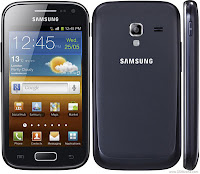
Samsung Galaxy Ace 2
Because I realise that not everyone needs a 1.5GHz quad-core, all singing, all dancing smart phone with true HD screen and 8MP camera. (I said 'realise'... doesn't mean I don't understand why). But, either way... I thought I'd write a post on what's set to be the benchmark setter for the next tier down... The Samsung Galaxy Ace 2.

The Samsung Galaxy Ace 2 is very much a sequel to the original Ace, and is doesn't just stop at the name. The guys at Samsung have obviously taken a note from the previous success of the original in terms of the design, only adding a little more curve to it, making it more rounded.

It does have a more solid a feel than it's predecessor. However, as with most Samsung's, it still feel a little tacky, a bit flimsy and a bit cheap, but the weight and build quality feels about right for a phone that will likely land in the £200-£300 category SIM free.

I think one of the largest letdowns about the new Galaxy Ace 2 is its lack of Ice Cream Sandwich, despite having a dual core 800MHz processor, you'd have thought it being more than up to the job of becoming the baseline model for the new version of Android, and with no current rumours coming from Samsung as to whether the new OS will be emerging on the handset, this could be the end before it begins. That said... the market the new Galaxy Ace 2 is aimed at, quite possibly won't care what version of Android its running.

I think the biggest let down of the Samsung Galaxy Ace 2 is its processing power... it's not what you expect for what could have been the leader of this category of phone. Jumping from app to app, opening trays and using apps isn't as smooth as you would expect (or hope). Which is a surprise considering the 800MHz Dual core should be more than capable of the task.

The camera hasn't changed either. Still 5MP and still with a single LED flash. Again, the speed of the processor lets it down again, with the shutter speed seeming somewhat delayed, meaning you could quite possibly miss that perfect shot you were trying to capture.

Overall, the Samsung Galaxy Ace 2 is definitely a step in the right direction for a handset in this category – it's, faster, smoother and has slightly improved build quality.
However, I can't help but feel it could have been so much better. 

BUT... I use a HTC One X, so maybe, just maybe... I'm setting my benchmark a little high.

The Samsung Galaxy Ace 2 is now available on Three on a variety of tariffs.

Thursday, 10 May 2012

Reaching The Mark? The New Samsung Galaxy S3

Right, so I have to get clear off-the-bat, that I'm not a big fan of Samsung phones. As I've said in previous posts, there was something with the Samsung Galaxy Nexus that didn't quite 'click' with me and I think that was down to the way Samsung phones handle the front end of Android Ice Cream Sandwich. But, needless to say, I do know that the new Samsung Galaxy S3 will have been eagerly awaited by those Galaxy S2 fans out there, and to those of you that this is aimed at, this could be the phone of the year for you. Samsung's new 'flagship handset' so-to-speak. So to keep this as professional as I can, I will try to be as un-biased as possible and give it the credit it deserves. 

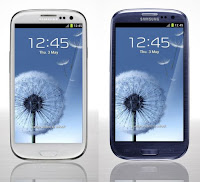
One of the things I really disliked about the Galaxy S2, was it's flat, boring, rectangular shape, almost without any curves whatsoever. Samsung have ditched this, and opted for a more oval shaped approach, very much like the Galaxy Nexus. (Which I have to say, is a very pretty phone), and lets be fair... What your phone looks like, is becoming more and more important when choosing it. So already, Samsung have got a +1 in my books for the looks of the Galaxy S3. It's also considerably bigger than its predecessor, the S2. 4.8 inch corner to corner, JUST slightly larger than my HTC One X, making it one of the largest smartphones on the market. Obviously no where near the size of the Samsung Galaxy Note... but that's just ridiculous :P

Another interesting feature coming from Samsung with the S3, is that you can now get it in either white or blue... That's a new one... I can't say I've seen many blue phones about. This will add somewhat a distinction to the handset when stood around on the train, bus stop, or wherever you are when looking at what phone the person next to you is using. You'll easily be able to identify that it's a Galaxy S3.

Following in the Galaxy Nexus' footprint (and in keeping up with the trend), the new Galaxy S3 is also has a true HD screen, matching the HTC One X's 1280 x 720, although the S3 uses Super AMOLED screen, whereas the HTC One X uses Super LCD 2. I'm sure there will be some uber boffins out there that will correct me on this, but to me, the truth is that it's getting harder and harder to distinguish between all these technologies, as both theses screens are superb.

The Galaxy S3 comes with an 8-megapixel camera, which is the same resolution as last year's Galaxy S2. Although It might not have increased the pixel count, it does have some new and quite cool features, including one of my favourites from the Galaxy Nexus, which was its ability to capture a shot the split second you hit the shutter button, with no lag whatsoever, thus making sure you NEVER miss a shot, as well as other common features such as face and smile detection.

The S3 packs a powerful quad-core processor clocked at 1.4GHz (not quite the 1.5GHz of the HTC One X - but what's 0.1GHz between friends), which should make it more than capable when playing high-resolution video and graphically demanding games. However, I have noticed with the HTC One X, that as phones get more powerful, the apps and games that are released are equally becoming more demanding, making it un-noticeable that you are using a phone with just as much (or in some cases) more power than  your home PC or laptop. But I suppose, that was to be expected. Needless to say, the Samsung Galaxy S3 is definitely up there with the big boys when it comes to processing power.

All the usual toys are packed into the S3 too, such as Samsung Beam (S Beam), which works very similar to the NFC features on HTC and other android phones, allowing you to instantly pass data from one phone to another, only this time, as apposed to going over NFC, S Beam uses wifi, making it slightly faster (if that's possible).

I think the newest toy to come with the Galaxy S3 is the new S Voice... a strike back at Apple's Siri. Siri well and truly stole the majority of the limelight in the aftermath of the iPhone 4S launch: It could be said, that the iPhone 4S was marketed almost exclusively for it’s voice assistant feature. But what the people loved, more than actually productive stuff like scheduling appointments or sending texts, were the more... random commands (some of which are admittedly hilarious), such as telling Siri 'I love you' and asking 'where is the best place to hide a body?'. Each one coming back with a witty answer, such as 'but we barely know each other' and listing places such as local tips, morgues and rivers. But now it's Samsung's turn. In addition to initiating calls, S Voice can wake the phone, request songs, send emails and text messages, use the calendar app, adjust the volume, capture photos, snooze the alarm and enquire about the weather, making Siri old news. For now, Samsung says this feature will support eight languages, including, among others, Spanish, German, Korean and American / British English.

In Summary, it would seem that there's not a great deal of change with the Galaxy S3, other than upgrading all the major components... but, with the S2 being such a huge success, there wasn't a great deal to change other than bringing it in to the current (ever changing) times. And although I won't be rushing out to get my hands on one, I'm confident it will be the success that the Galaxy S2 was last year.

Wednesday, 9 May 2012

The Cookie Law


On 26th May 2012 all UK websites must offer their users a consent mechanism to allow cookies to store information about your browsing activity and potentially pass this to 3rd parties. This includes tools such as Google Maps, Google Analytics, social sharing buttons and many more! But what does this mean for your website?

What are cookies?
Cookies are a small sweet cake (biscuit), typically round, flat, and crisp. The best cookies usually have chocolate chips in them, or (my personal favourite) are chocolate biscuits with chocolate chip cookies in them... #NomNom... OK.. slightly off track there. In the digital world, cookies are small text files that are stored on the user's computer (yours) to remember choices as you navigate round the site. They are used to remember user preferences, to track site performance and to target advertising. Essentially making your user journey better.

What is the law?
‘The Privacy and Electronic Communications (EC Directive)(Amendment) Regulations 2011’ has been commonly referred to for at least the last 12 months as the ‘Cookie Law’.

What does it do?
In short, it means that all website operators are now required to ask a website user’s permission when placing certain types of cookies on their devices or computers. They must also explain what they are and why they are placed there.

When did it become law?
26 May 2011, and assumed that browser technology could be used to manage cookie permissions. However, this was not the case, and the Information Commissioners Office (ICO) declared a suspension on enforcing the law until 26 May 2012 by when browser developments would have caught up. Again, this has not proved to be the case, which has left all website operators with the task of implementing measures to comply. With no practical guidance being issued by the ICO on how to do this, companies are taking their lead from the ICC (International Chamber of Commerce).

What can be done?
To ensure your site complies with the law, your Privacy Policy on your sites must explain the different types of cookies used and how you use them. There are four categories of cookies summarised as; strictly necessary, performance, functionality and targeting. In addition, users have to give permissions to allow categories two to four.

What else can be done?
The ICC have interpreted the law to mean that you can gather consent for category one to three cookies by agreement to terms and conditions or privacy policy. Category four, which is what the law was specifically targeted for, and requires explicit consent.

Hungry for more cookies?
For more information on the Cookie Law, visit The Cookie Collective, or visit BBC Food (I know which I prefer :) 

Monday, 30 April 2012

Where Apple Are Going Wrong...


Well it's been a few days (almost a week) since I wrote my last blog post, and already I'm starting to feel like a naughty school boy for not doing something that I should have done. Not to mention the with-drawl symptoms I am getting from not writing.

So I thought today, I would write a post to let Apple know where they are going wrong. And because I because I know my opinion means a lot to them, I know they will honor it and completely re-write their strategy, launching the new iPhone 5 (whenever that may be) with a completely new look,  cut me in on the profit thus making me a millionaire over night. (Well.. you can but dream!).

I used an iPhone for a quite a long time in comparison to other handsets I've had. I even bought my girlfriend one for Christmas last year, so obviously, I appreciate that they are amazing phones. They are built to an extremely high standard, they look beautiful, and in terms of their touchscreen, they are more responsive than any other phone on the market. Quite simply, they are perfect... Which is where I think they fall flat.

To maintain their perfection, they have sacrificed a certain element that I think a lot of people (particularly Android users) want from a smart phone... They lack that element of fun!

When I hit the unlock button on my HTC One X, I am suddenly hit by a smoothly animated picture showcase. Beautiful images flying around the screen in Polaroid style frames which make me smile every time I unlock it - each one displaying in a crisp, sharp resolution making me smile in amazement at its performance, followed by an almost bigger smile as the memory of the photo which is being displayed. And because I have so many photo's on my phone, It's very rare that I am shown the same picture as last time. Making each time I unlock, a new reminiscing moment of happy times in my life...

OK... so maybe the above is a bit much, and making you want to grab a bucket... but it's just one of the simple things you can do with an Android phone which you can't with an iPhone. And of course, this is only one of the features you can set to the unlock screen... You can have a vast array of things displayed there to make your day so much brighter, including the local weather. Beautiful animation of what the weather 'could be doing' near you.. (although you could look out the window). You can have notifications up there also, allowing you to see who's been messaging / emailing or calling you without even having to go in to the phone, which can be simply dragged into the unlock ring, transporting you instantly to whatever app is delivering this notification. 

You can even display your latest Footprints updates up there... Instantly displaying your closest friend's and family's latest Facebook and Twitter updates. All of which you don't get from an iPhone.

Other little things an iPhone can't do which Android does effortlessly are the widgets... And we all love our widgets. I'm particularly fond of my newest widget which set me back a whole £1.60... Ouch! The Pure Calendar widget, (linked directly to my Google ID) displays all my calendar entries on the home screen, allowing me to see where I'm supposed to be and what I'm supposed to be doing over the coming week without making a mess of my home screen. This fully customisable app can be set to a small font with a transparent background so that it doesn't take away from your favourite wallpaper in the background... Now to me, that's perfection :)

I'm not gonna go on listing all the little functions and widgets that are available on Android but not on iPhone... But I will end this with 2 quotes that I've had from Sally and my Mum...

Sally on the iPhone:
The iPhone does exactly as you expect, as soon as you take it out the box, or tap on one of the apps, you know exactly what its going to do.... It lack's fun!

Mum on her HTC Sensation XL:
I can always find some new function/feature, each time I play with it. It's smooth and fast and never had any issues.

So there you go Apple... Make your next iPhone a little more exciting, make it a little less user friendly, and most of all... MAKE IT MORE FUN!!! :)


If like me, your a fan of all things tech, including Android... Check out my mates blog. Relevant Social Media. It's full of interesting articles including a Full Serving Of Ice Cream Sandwich and the new Samsung Galaxy SIII (boooo). Not just pushing this blog because he's a mate... it genuinely is a really good, easy reading and informative blog... So check him out! 


Monday, 23 April 2012

Google - Much, Much More Than An Email...

OK, so I'm a huge fan of Google. Not only do they produce what I believe to be the best mobile phone operating system (Yes folks... Android is Google's contribution to the smart phone world), but they also have a whole host of amazing products that have the ability to make your life (and mine) so much easier, enjoyable and integrated. Yet, it astounds me that in this day and age, in the era of smart phones, tablets and social networks, that many people I talk to (mostly friends that aren't in the digital industry that I am) aren't aware of what a Google ID actually is and don't see it as anything more than just another email address, much like Yahoo and MSN... This is FARRR from the case!

On that, I thought I would write my next blog post about a few of the features and functionality that Google provide me with on a daily basis. All of which don't cost me a penny, are all interlinked and enable me to be more organised, efficient and sociable. :)

Google Mail...
Yes, it's email... straight forward and simple email. But, your email address is just the start. It's not just an address... it's an ID. An online passport if you like. This ID is the core of all Google products, it is the login ID that you use for them all, and the ID which stores all that important information which you hold dear, and in some cases, (like mine) an online backup to your life... How? I'll tell you. But before I do, I'm sure of you by now are wondering... "what if I don't want Google to know everything about my life?" Well, unfortunately, they probably already do. What with all the data you share on Facebook, Twitter, MySpace and whatever other social media network, there's probably not a great deal about you life that isn't already on the world wide web. There is a benefit to this however, especially in Google's case. All this data that is collected, including your online browsing behaviour, shopping habits, type of websites visited, etc... is all used by Google to make your online experience better, particularly where advertising is concerned, because lets face it... you're gonna see ads. Doesn't matter if you like them or not, you're going to see them. So wouldn't you rather see something that is of interest to you? That's why Google collects this information. To make the ads you see, more relevant to you. But this post isn't about online marketing, its about Google and it's products.

OK, so we've established that Google Mail is the email functionality, but encompassed in this are a few other nice and handy little features. Google Talk, Calendar and (my favourite) Contacts.

Google Talk is very much like MSN messenger. Quite simply, it's a chat applet. The clever and most useful ones though are the calendar and contacts. They are as you would expect. They are a calendar, and a store for your contacts. However, if like me, you are a smart phone user these are automatically synced with your phone. Meaning as you add new appointments, meetings, contact details, etc... to either interface (phone or Desktop) these are updated on Google's servers, giving you access to them wherever you are... 'Simples'.

Don't you just hate it, when you get a new phone and have to transfer all your details across? Contacts, meetings, photo's etc... You're Google account removed this issue. Once your data is stored on Google, you simply connect your new phone to Google, and viola... all your contacts and details are restored :) 

So those are the basics... But then there's more... More (much more, but I'm not going into all).

Another one of my favourites is Google Reader... There are soo many blogs, forums, sites of interest out there these days that have an RSS feed, it's hard to keep up. Anything from the BBC, through to your local Poodle lovers site... (In simple terms, an RSS feed is a URL which pulls through the posts on a blog, forum etc... Copying this feed url in to a feed reader will display them all in that app, reader, site, etc). Google Reader does just that.

If I come across a new site that I like, and it has an RSS feed, I simply click it, and subscribe using my Google ID. This feed subscription (free) is then added to my list of feeds, which again, I can access either via Google Reader online, or the mobile app. This allows me to keep up to date on news and updates on things that I find interesting, and most mornings, I spend my commute to work reading the latest Android, Disney, and Driftworks updates. 

Google+ (plus)
Google+ is Google's answer to Facebook... Slightly behind the times in coming out, but slowly getting bigger in terms of people using it. And, to be honest, I quite like it. Its got some great features in it, such as Hangouts (Like video chat-rooms which you create and talk to mates using video), Circles (similar to Facebook friend groups, but much easier to use, segment, create, etc... as well as the ability to share certain things, comments, posts with certain Circles). I think one of the best features to Google+ however, is its seamless integration with Picasa, Google photo sharing service. You can link all your photo albums on Picasa directly to your Google+ account, and share them through that. As well as being able to them instantly download (or upload) these to / from your smart phone.

So there's just a few of the things which I use on a daily basis from Google, and maybe Yahoo and MSN offer exactly the same and maybe some of you reading this now are just as happy with your Yahoo & MSN accounts, but there's something about Google that makes you feel secure, makes you feel like your data is safe. Afterall, I have never had my Google account hacked and used to send spam, but I have my Hotmail, and, I've never had spam emails from any of my mates using Google, but I have their Yahoo...